How Digital Retail Platforms Like LS Central Are Revolutionizing Demand Forecasting
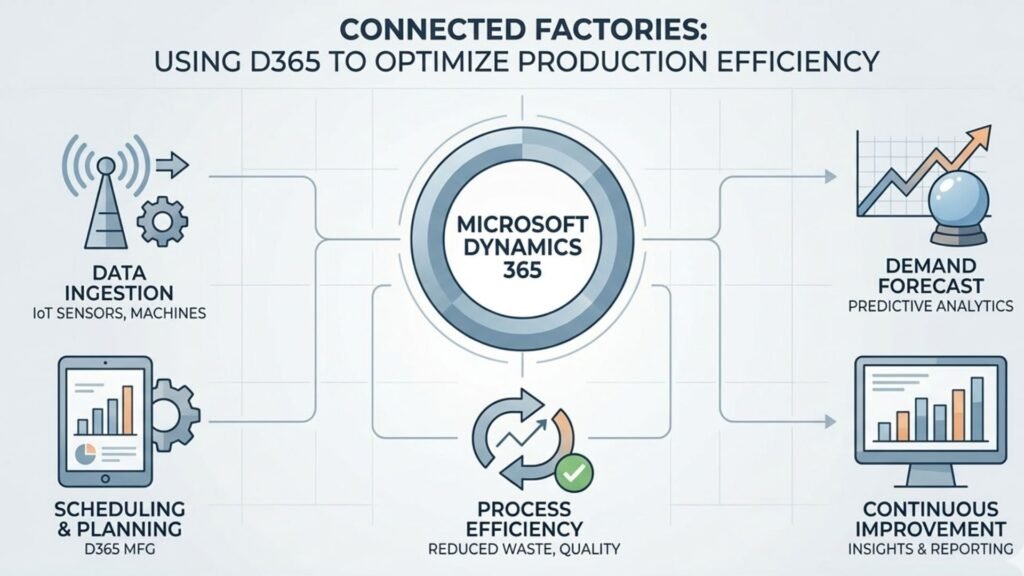
The retail industry is experiencing a major transformation driven by digital technologies, artificial intelligence, and data analytics. Today’s retailers operate in a highly competitive environment where customer expectations change rapidly, market trends evolve quickly, and supply chain disruptions can impact profitability. To remain competitive, businesses need accurate demand forecasting to anticipate customer needs and optimize inventory levels. This is where digital retail platforms like LS Central are making a significant difference. Built on Microsoft Dynamics 365 Business Central, LS Central provides retailers with an integrated solution that combines point-of-sale (POS), inventory management, customer insights, and advanced reporting capabilities. By centralizing data and leveraging intelligent analytics, retailers can forecast demand more accurately and make informed business decisions. Many organizations working with a trusted Microsoft Dynamics 365 partner in Texas, USA, are adopting LS Central to modernize their retail operations and gain better visibility into customer demand patterns. Understanding Demand Forecasting in Retail Demand forecasting is the process of predicting future customer demand based on historical sales data, seasonal trends, customer behavior, market conditions, and other business factors. Accurate forecasting helps retailers maintain the right inventory levels while reducing excess stock and stockouts. Traditional forecasting methods often relied on spreadsheets and manual calculations. While these approaches may have worked in the past, they struggle to keep up with the complexity of modern retail operations. Retailers now need real-time data and predictive analytics to respond effectively to changing market conditions. Digital retail platforms provide the tools necessary to collect, analyze, and interpret large volumes of business data, enabling more accurate forecasting and better planning. What is LS Central? LS Central is a unified retail management solution designed specifically for retailers, restaurants, pharmacies, hospitality businesses, and specialty stores. Built on Microsoft Dynamics 365 Business Central in Texas, USA, LS Central combines multiple business functions into a single platform. Instead of managing separate systems for POS, inventory, customer loyalty, purchasing, and financial management, businesses can manage everything through a single centralized solution. This unified approach creates a single source of truth for retail data, making demand forecasting more accurate and actionable. The Growing Importance of Digital Retail Platforms Modern retailers generate enormous amounts of data every day. Every transaction, customer interaction, inventory movement, and promotional campaign creates valuable information. Without the right tools, much of this data remains underutilized. Digital retail platforms transform raw data into meaningful business insights by providing the following: These capabilities help retailers make proactive decisions rather than reactive ones. How LS Central Improves Demand Forecasting Centralized Data Management One of the biggest challenges retailers face is fragmented data spread across multiple systems. LS Central consolidates sales, inventory, purchasing, customer, and financial information into a single platform. When all business data is connected, retailers gain a complete view of customer behavior and purchasing trends. This centralized approach improves forecast accuracy because decisions are based on comprehensive and up-to-date information. Businesses working with Microsoft Dynamics consulting services in Texas, USA, often identify data silos as a major obstacle to effective forecasting. LS Central helps eliminate these barriers. Real-Time Sales Visibility Demand forecasting depends heavily on accurate sales data. LS Central provides real-time sales visibility across all retail locations and channels. Retail managers can monitor the following: With access to current information, businesses can quickly adjust purchasing plans and inventory strategies before shortages or overstock situations occur. Advanced Inventory Intelligence Inventory optimization is closely connected to demand forecasting. Excess inventory increases carrying costs, while insufficient inventory leads to lost sales. LS Central enables retailers to monitor stock levels continuously and identify patterns that impact future demand. The platform provides automated replenishment recommendations based on sales history, inventory turnover, and forecasted demand. This intelligence allows retailers to maintain optimal stock levels while improving customer satisfaction. AI and Predictive Analytics in Demand Forecasting Artificial intelligence is changing the way retailers forecast demand. Traditional forecasting models rely heavily on historical data, while AI-powered forecasting incorporates multiple variables to generate more accurate predictions. LS Central, integrated with Microsoft technologies, can analyze the following: AI-driven forecasting helps businesses identify opportunities and risks before they affect operations. Organizations utilizing Microsoft Dynamics 365 Support Services in Texas, USA, often leverage AI-powered analytics to improve forecasting accuracy and enhance decision-making capabilities. Omnichannel Retail and Demand Forecasting Today’s customers shop through multiple channels, including physical stores, eCommerce platforms, mobile applications, and social media marketplaces. This omnichannel environment creates additional forecasting challenges because demand patterns vary across channels. LS Central provides a unified view of customer activity across all touchpoints. Retailers can analyze purchasing behavior regardless of where transactions occur. This comprehensive visibility improves forecasting by ensuring that demand predictions reflect the entire customer journey rather than isolated sales channels. Seasonal Demand Management Retail demand often fluctuates based on seasons, holidays, and special events. Predicting these fluctuations accurately is essential for maximizing sales opportunities. LS Central enables retailers to analyze historical seasonal trends and compare performance across multiple years. For example, retailers can: By understanding seasonal patterns, retailers can avoid stock shortages during peak periods while minimizing excess inventory during slower seasons. Customer Behavior Analysis Demand forecasting is not only about products—it is also about customers. LS Central provides detailed customer insights that help retailers understand purchasing preferences, buying frequency, and shopping habits. Retailers can identify: These insights help businesses predict future demand more accurately and develop targeted marketing strategies that drive revenue growth. Improved Supply Chain Planning Demand forecasting directly impacts supply chain efficiency. When forecasts are inaccurate, businesses may experience delayed shipments, excess inventory, or missed sales opportunities. LS Central improves supply chain planning by providing greater visibility into inventory levels, supplier performance, and purchasing requirements. Retailers can collaborate more effectively with suppliers and make informed procurement decisions based on forecasted demand. Companies implementing MS Dynamics 365 implementation services in Texas, USA, frequently use LS Central to strengthen supply chain operations and improve inventory planning processes. Data-Driven Decision Making Retail success increasingly depends on the ability to make data-driven decisions. LS Central provides dashboards, reports, and analytics tools that transform
How Digital Retail Platforms Like LS Central Are Revolutionizing Demand Forecasting Read More »